Planning for an overseas market? Choose your country and local setup route. Check where you operate separately from where your customers live.
A readable draft page with one working next action.
A page should answer the decision before asking for the action.
Choose the page’s one job
Decide whether this page asks for an enquiry or a resource subscription. These are different intentions. An enquiry asks for a response about a service; a subscription asks to receive specified content. Write the button label before choosing a template. “Ask about the lesson package” is clearer than “Unlock success”.
Continue the fictional tutor example: a page introduces lesson formats and invites a parent or adult learner to ask about availability. It does not need a store, membership area or elaborate funnel to explain the first conversation.
Build six useful sections
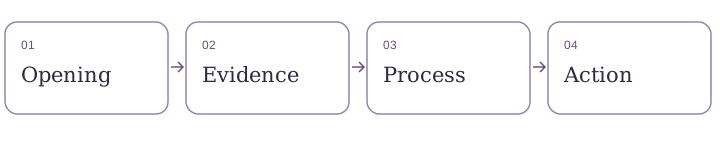
- Opening: who the service is for, what it includes and the main button.
- Situation: the practical problem the reader recognises.
- Scope: deliverables, inputs, timing and exclusions.
- Evidence: real work or clearly labelled sample material.
- Process: enquiry, agreement, delivery and follow-up.
- Questions: answer the uncertainties that block a sensible decision.
Keep paragraphs short and headings descriptive. Use a relevant image with a useful text alternative. A decorative photo must not look like a testimonial from a real customer.
Put it into a builder
Systeme.io provides page-building tools. Start with a simple layout available in your account and replace its sample content with your brief. For a resource subscription, use an opt-in page; for a service enquiry, choose a contact method that actually supports the details you need. Do not assume a newsletter form is a complete enquiry system.
Keep your existing website if it already works. The useful comparison is the effort required to maintain the page and follow-up, not the number of features on a pricing table. Check your account’s current plan limits before adding another funnel or domain.
Test the whole path
- Open the published draft on a narrow screen. Read the headline without zooming.
- Follow every primary button. Confirm the destination matches its wording.
- If there is a form, submit a clearly labelled test using an address you control.
- Check the confirmation, the received information and your ability to reply.
- Use the keyboard to reach links and inputs; check visible focus and field labels.
A button animation is not proof that the message arrived. If delivery fails, fix that before inviting visitors. These are checks for you to perform; this lesson does not claim that your account’s page has passed them.
Completion check and common repairs
If readers cannot explain the service, shorten the opening and move scope details upward. If they understand but hesitate, answer the actual uncertainty: price basis, availability, revision policy or evidence. Adding another signup button rarely answers those questions.
- One main action appears near the opening and after the details.
- Sample content and unsupported claims are removed.
- The contact path works and someone monitors it.
- There is a clear explanation of what happens next.
From principle to practice
Primary action means the main next step a page invites the reader to take, such as asking about availability. The useful habit is to make this explicit before adding another tool.
ANNOTATED EXAMPLE · FICTIONAL TEACHING SCENARIO
A small rewrite, a clearer decision
Welcome to my website. Learn more. Contact. Subscribe. Buy now.
One-to-one lesson support for adult beginners. See the format, preparation and availability, then ask whether the service fits your needs.
Why it helps: The revised opening gives context before requesting a response. Different buttons may still be useful elsewhere, but they should not compete with the page’s main purpose.
Sketch six page sections on paper. Give each one a question to answer. Remove any section that repeats an answer without helping the decision.
Do not publish a contact button simply because it looks finished. Follow it all the way to the received message and confirmation.
Keep a record of what you changed. Separate what you observed from what you hope will happen. The worksheet below gives you a place to write the decision, test result and next action.
Do I need to rebuild an existing site?
Usually the first task is to improve the page you already have. Compare tools only when there is a specific maintenance, delivery or follow-up problem to solve.
YOUR FREE COMPANION
Make this lesson your own
Download eight guided prompts for this task, or print the complete six-lesson workbook. No signup. No email gate. Save your answers in your own files.
Free to adapt for your own business. Examples are teaching aids, not legal forms or guaranteed business outcomes.
Where Systeme.io fits
Systeme.io can help organise the page and a subscription path. It is a sensible option when you also need email follow-up; a working existing page may be sufficient.
You still supply the offer, useful content, visitors and customer care. Software does not guarantee customers or income.
Explore Systeme.ioWe may earn a commission if you buy through this link, at no extra cost to you. How recommendations are funded.
Sources and scope
Editorial teaching examples; not a report of a completed customer project or an end-to-end account test. Prepared 8 October 2026.
- Page-building and opt-in concepts — checked 8 October 2026.
Check current official plan limits and billing options before choosing a subscription. No paid plan is required to complete the planning exercises. This guide does not quote prices or promise that every feature is included in your plan.